


 |
|
|
|
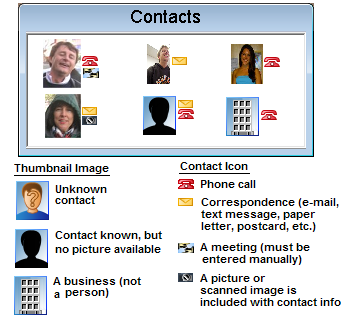
The contacts panel shows the e-mail, phone messages and other contacts you had with people on this day. Phone numbers and e-mail addresses are matched with those in your BioBook to identify the people and to get a "thumbnail" picture of each person (if you've created one). If the number or e-mail can't be identified you'll see the question mark icon. If it can be identified but you haven't created a "thumbnail" image yet, you'll see the the silhouette. If the contact is a business, and no logo has been assigned yet, you'll see a building. Correspondence contacts can include letters and postcards, but these must be entered manually as a photo or scanned image. |
|
 |
 |
 |
 |
5 |  |
 |
 |
 |
 |
|
 |