

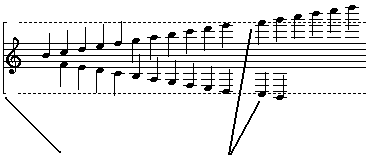
"Vertical Exent Marker"
These notes are beyond the vertical exent of the staff line
If you click the mouse above or below the vertical extent of the staff
line MusEdit will assume you are trying to position the caret in the line
above or below the staff line. This complicates things if you are
trying to enter a very high or low note outside of the range of the vertical
extent. What you have to do is click the mouse somewhere within
the vertical extent, then use the Up/Down Arrow keys to move the
caret out of the vertical extent. Since this motion is starting from
within the staff line MusEdit will assume you are still in the staff line
and will keep supplying ledger lines as needed (up to the maximum shown
above). Once you have the caret at the proper staff location, use
the keyboard to enter a note with the keyboard code ( q=quarter note, t=eighth
note, etc.)
Notes:
 | If you need space between the line above and the treble line (to keep the high notes from getting tangled in the line above) put the caret in the line above, then hit Ctrl+T to insert a blank line, which will act as a space |
| You will probably need to use Refresh (Ctrl+R) more than usual when dealing with notes outside of the vertical extent of a staff line (see Refreshing - Why Is It Necessary? for details) |
| MusEdit doesn't automatically translate to octave ( 8va ) notation for notes which are unnaturally high above the staff. If you want to draw very high pitched notes with 8va notation you will have to lower them yourself by an octave, then insert two "extended objects" above them: a text object (Ctrl+Shift+T) with the characters "8va"; then a phrase line (Ctrl+Shift+H) of the "Dashed Right End" type right next to it, as shown here: |
